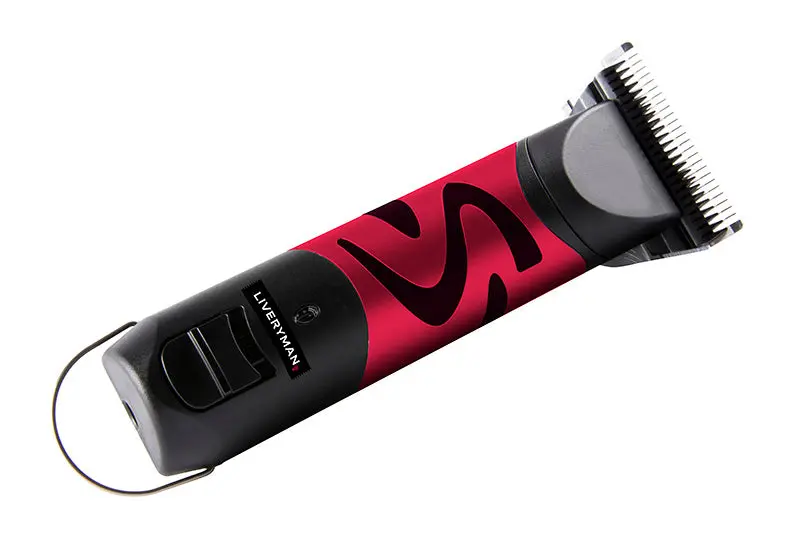
Liveryman Harmony Plus Wide Fine Blade 2.4mm Clippers
Liveryman Harmony Plus Clippers – Cordless, Quiet and Ideal for Horses, Dogs and Sensitive Areas
The Liveryman Harmony Plus Clipper is a quiet, powerful and highly versatile cordless clipper designed for both horses and dogs. Combining the performance of a full clipper with the precision of a trimmer, it’s ideal for everything from full-body clips to CPL management, leg and face trimming, and sensitive medical clipping. Supplied with a Wide Fine 2.4mm blade, the most popular choice for all-round clipping.
Powered by advanced brushless motor technology, the Harmony Plus delivers a long-lasting 10,000-hour motor life, with up to 90 minutes of cordless run time on a single charge. It’s lightweight, ultra-quiet, and low-vibration – making it an excellent choice for nervous animals or areas that require a gentle touch.
Key Features
-
Clipper and trimmer in one – ideal for full clips, legs, faces, medical prep and delicate areas
-
Suitable for horses and dogs
-
Cordless operation with up to 90 minutes run time per charge
-
Brushless motor – 10,000-hour lifespan and reliable, low-maintenance performance
-
No air vents – prevents hair and dust clogging for a cleaner, longer-lasting motor
-
Uses snap-on A5 blades (sold separately) – no tensioning required, fast and easy blade changes. These blades are incredibly easy to change and clip on or off with ease.
-
Quiet and lightweight – excellent for nervous or young animals
-
Includes mains adaptor, clipper oil, cleaning brush and instruction manual
-
Presented in a durable storage case with a slot for optional battery pack (not included)
-
Two-year warranty
Ideal For
-
Horses and dogs
-
Nervous or sensitive animals
-
Legs, faces, and areas affected by CPL
-
Veterinary or medical clipping
-
Private clipping or yard use
How to Attach Harmony Plus Clipper Blades
Attaching blades to your Harmony Plus clippers correctly ensures smooth, safe clipping and helps maintain your equipment long-term. Follow this step-by-step guide:
1. Identify the Key Parts
Before starting, locate:
-
The drive lever, hinge, and red latch on your clipper
-
The blade socket at the back of your clipper blade
2. Position the Blade
Hold the blade so the socket lines up with the hinge on the clipper body.
3. Hook the Blade onto the Hinge
Carefully slide or hook the bottom of the blade onto the hinge tabs until it rests in place.
4. Align with the Drive Lever
Gently adjust the cutter left or right until the drive lever sits neatly in the centre gap of the cutter.
5. Engage the Blade
Push the blade forwards towards the clipper body. You should feel or hear the first click.
6. Lock it in Place
Push the red latch upwards until you feel the blade snap securely into position. This confirms the blade is locked and ready to use.
Quick Tip:
Before switching on your clipper, make sure the blade lies flat and even. If it rattles, pulls, or won’t cut smoothly, remove and reattach — ensuring the drive lever is correctly seated within the cutter gap.
How to Apply Blade Wash Spray & Clipper Oil
Regular cleaning and oiling will improve performance and extend the life of your Harmony Plus clipper blades.
1. Switch On the Clipper
Run the clipper so the blades are moving. This helps distribute the oil evenly.
2. Apply a Light Spray
Hold the blade wash spray or clipper oil about 3–5 cm from the blades. Using your finger to guide the nozzle, apply a light, even mist across the moving blades.
Avoid over-spraying — a light coat is all you need.
3. Let It Run Briefly
Allow the clipper to run for 5–10 seconds to let the liquid work into the moving parts.
4. Wipe Off Excess
Turn off the clipper and wipe away any excess with a clean, dry cloth. This prevents oil buildup which can trap hair and dust.
Why Use Blade Wash and Oil?
-
Blade wash: Cleans out hair, dust, and residue from the cutter
-
Clipper oil: Reduces friction, prevents overheating, and extends blade lifespan
Pro Tip:
If you accidentally over-oil, use blade wash spray to flush out the excess before reapplying a light coat.
Quick Troubleshooting for Harmony Plus Clippers
Blade Won’t Seat or Click?
-
Ensure the square gap in the cutter sits over the drive lever
-
Hold the red release latch while pressing the blade down firmly
-
New or tight-fitting A5 blades may feel stiff at first
Hinge Won’t Stay Upright?
-
Use a flat-head screwdriver to gently lift the hinge into position before attaching the blade
Poor Cutting or Overheating?
-
Clean and oil blades more frequently during use
-
Check for dull or damaged blades and have them resharpened if needed
Liveryman Harmony Plus Clippers – Cordless, Quiet and Ideal for Horses, Dogs and Sensitive Areas
The Liveryman Harmony Plus Clipper is a quiet, powerful and highly versatile cordless clipper designed for both horses and dogs. Combining the performance of a full clipper with the precision of a trimmer, it’s ideal for everything from full-body clips to CPL management, leg and face trimming, and sensitive medical clipping. Supplied with a Wide Fine 2.4mm blade, the most popular choice for all-round clipping.
Powered by advanced brushless motor technology, the Harmony Plus delivers a long-lasting 10,000-hour motor life, with up to 90 minutes of cordless run time on a single charge. It’s lightweight, ultra-quiet, and low-vibration – making it an excellent choice for nervous animals or areas that require a gentle touch.
Key Features
-
Clipper and trimmer in one – ideal for full clips, legs, faces, medical prep and delicate areas
-
Suitable for horses and dogs
-
Cordless operation with up to 90 minutes run time per charge
-
Brushless motor – 10,000-hour lifespan and reliable, low-maintenance performance
-
No air vents – prevents hair and dust clogging for a cleaner, longer-lasting motor
-
Uses snap-on A5 blades (sold separately) – no tensioning required, fast and easy blade changes. These blades are incredibly easy to change and clip on or off with ease.
-
Quiet and lightweight – excellent for nervous or young animals
-
Includes mains adaptor, clipper oil, cleaning brush and instruction manual
-
Presented in a durable storage case with a slot for optional battery pack (not included)
-
Two-year warranty
Ideal For
-
Horses and dogs
-
Nervous or sensitive animals
-
Legs, faces, and areas affected by CPL
-
Veterinary or medical clipping
-
Private clipping or yard use
How to Attach Harmony Plus Clipper Blades
Attaching blades to your Harmony Plus clippers correctly ensures smooth, safe clipping and helps maintain your equipment long-term. Follow this step-by-step guide:
1. Identify the Key Parts
Before starting, locate:
-
The drive lever, hinge, and red latch on your clipper
-
The blade socket at the back of your clipper blade
2. Position the Blade
Hold the blade so the socket lines up with the hinge on the clipper body.
3. Hook the Blade onto the Hinge
Carefully slide or hook the bottom of the blade onto the hinge tabs until it rests in place.
4. Align with the Drive Lever
Gently adjust the cutter left or right until the drive lever sits neatly in the centre gap of the cutter.
5. Engage the Blade
Push the blade forwards towards the clipper body. You should feel or hear the first click.
6. Lock it in Place
Push the red latch upwards until you feel the blade snap securely into position. This confirms the blade is locked and ready to use.
Quick Tip:
Before switching on your clipper, make sure the blade lies flat and even. If it rattles, pulls, or won’t cut smoothly, remove and reattach — ensuring the drive lever is correctly seated within the cutter gap.
How to Apply Blade Wash Spray & Clipper Oil
Regular cleaning and oiling will improve performance and extend the life of your Harmony Plus clipper blades.
1. Switch On the Clipper
Run the clipper so the blades are moving. This helps distribute the oil evenly.
2. Apply a Light Spray
Hold the blade wash spray or clipper oil about 3–5 cm from the blades. Using your finger to guide the nozzle, apply a light, even mist across the moving blades.
Avoid over-spraying — a light coat is all you need.
3. Let It Run Briefly
Allow the clipper to run for 5–10 seconds to let the liquid work into the moving parts.
4. Wipe Off Excess
Turn off the clipper and wipe away any excess with a clean, dry cloth. This prevents oil buildup which can trap hair and dust.
Why Use Blade Wash and Oil?
-
Blade wash: Cleans out hair, dust, and residue from the cutter
-
Clipper oil: Reduces friction, prevents overheating, and extends blade lifespan
Pro Tip:
If you accidentally over-oil, use blade wash spray to flush out the excess before reapplying a light coat.
Quick Troubleshooting for Harmony Plus Clippers
Blade Won’t Seat or Click?
-
Ensure the square gap in the cutter sits over the drive lever
-
Hold the red release latch while pressing the blade down firmly
-
New or tight-fitting A5 blades may feel stiff at first
Hinge Won’t Stay Upright?
-
Use a flat-head screwdriver to gently lift the hinge into position before attaching the blade
Poor Cutting or Overheating?
-
Clean and oil blades more frequently during use
-
Check for dull or damaged blades and have them resharpened if needed
Original: $465.27
-70%$465.27
$139.58Description
Liveryman Harmony Plus Clippers – Cordless, Quiet and Ideal for Horses, Dogs and Sensitive Areas
The Liveryman Harmony Plus Clipper is a quiet, powerful and highly versatile cordless clipper designed for both horses and dogs. Combining the performance of a full clipper with the precision of a trimmer, it’s ideal for everything from full-body clips to CPL management, leg and face trimming, and sensitive medical clipping. Supplied with a Wide Fine 2.4mm blade, the most popular choice for all-round clipping.
Powered by advanced brushless motor technology, the Harmony Plus delivers a long-lasting 10,000-hour motor life, with up to 90 minutes of cordless run time on a single charge. It’s lightweight, ultra-quiet, and low-vibration – making it an excellent choice for nervous animals or areas that require a gentle touch.
Key Features
-
Clipper and trimmer in one – ideal for full clips, legs, faces, medical prep and delicate areas
-
Suitable for horses and dogs
-
Cordless operation with up to 90 minutes run time per charge
-
Brushless motor – 10,000-hour lifespan and reliable, low-maintenance performance
-
No air vents – prevents hair and dust clogging for a cleaner, longer-lasting motor
-
Uses snap-on A5 blades (sold separately) – no tensioning required, fast and easy blade changes. These blades are incredibly easy to change and clip on or off with ease.
-
Quiet and lightweight – excellent for nervous or young animals
-
Includes mains adaptor, clipper oil, cleaning brush and instruction manual
-
Presented in a durable storage case with a slot for optional battery pack (not included)
-
Two-year warranty
Ideal For
-
Horses and dogs
-
Nervous or sensitive animals
-
Legs, faces, and areas affected by CPL
-
Veterinary or medical clipping
-
Private clipping or yard use
How to Attach Harmony Plus Clipper Blades
Attaching blades to your Harmony Plus clippers correctly ensures smooth, safe clipping and helps maintain your equipment long-term. Follow this step-by-step guide:
1. Identify the Key Parts
Before starting, locate:
-
The drive lever, hinge, and red latch on your clipper
-
The blade socket at the back of your clipper blade
2. Position the Blade
Hold the blade so the socket lines up with the hinge on the clipper body.
3. Hook the Blade onto the Hinge
Carefully slide or hook the bottom of the blade onto the hinge tabs until it rests in place.
4. Align with the Drive Lever
Gently adjust the cutter left or right until the drive lever sits neatly in the centre gap of the cutter.
5. Engage the Blade
Push the blade forwards towards the clipper body. You should feel or hear the first click.
6. Lock it in Place
Push the red latch upwards until you feel the blade snap securely into position. This confirms the blade is locked and ready to use.
Quick Tip:
Before switching on your clipper, make sure the blade lies flat and even. If it rattles, pulls, or won’t cut smoothly, remove and reattach — ensuring the drive lever is correctly seated within the cutter gap.
How to Apply Blade Wash Spray & Clipper Oil
Regular cleaning and oiling will improve performance and extend the life of your Harmony Plus clipper blades.
1. Switch On the Clipper
Run the clipper so the blades are moving. This helps distribute the oil evenly.
2. Apply a Light Spray
Hold the blade wash spray or clipper oil about 3–5 cm from the blades. Using your finger to guide the nozzle, apply a light, even mist across the moving blades.
Avoid over-spraying — a light coat is all you need.
3. Let It Run Briefly
Allow the clipper to run for 5–10 seconds to let the liquid work into the moving parts.
4. Wipe Off Excess
Turn off the clipper and wipe away any excess with a clean, dry cloth. This prevents oil buildup which can trap hair and dust.
Why Use Blade Wash and Oil?
-
Blade wash: Cleans out hair, dust, and residue from the cutter
-
Clipper oil: Reduces friction, prevents overheating, and extends blade lifespan
Pro Tip:
If you accidentally over-oil, use blade wash spray to flush out the excess before reapplying a light coat.
Quick Troubleshooting for Harmony Plus Clippers
Blade Won’t Seat or Click?
-
Ensure the square gap in the cutter sits over the drive lever
-
Hold the red release latch while pressing the blade down firmly
-
New or tight-fitting A5 blades may feel stiff at first
Hinge Won’t Stay Upright?
-
Use a flat-head screwdriver to gently lift the hinge into position before attaching the blade
Poor Cutting or Overheating?
-
Clean and oil blades more frequently during use
-
Check for dull or damaged blades and have them resharpened if needed